Memory Banks in Coding Agents
How to give your coding agents long term memories without reaching for external tools
Recently, one of my colleagues from the infra team popped me a message asking if I’d “ever used something like ByteRover” to manage context across sessions for Claude Code as he was getting frustrated with it losing context during debugging of some kubernetes policies when a Claude Code session would or reach compaction levels or a session would crash. “Some sort of context memory would be very handy”, he followed up.
Before bringing in another dependency I was curious what he’d already tried to manage his context. As it turned out, not much, and he wasn’t even aware that you can resume and rename a session within almost all coding agents. So here I am writing this post, for those who don’t immediately dig through all the menus and documentation of a new tool before using it like I do.
What is memory?
At a high level, memory for a coding agent is a way of remembering information you want the agent to have access to beyond one session or after it runs out of context. Context being the short term memory that only sticks around for the current session.
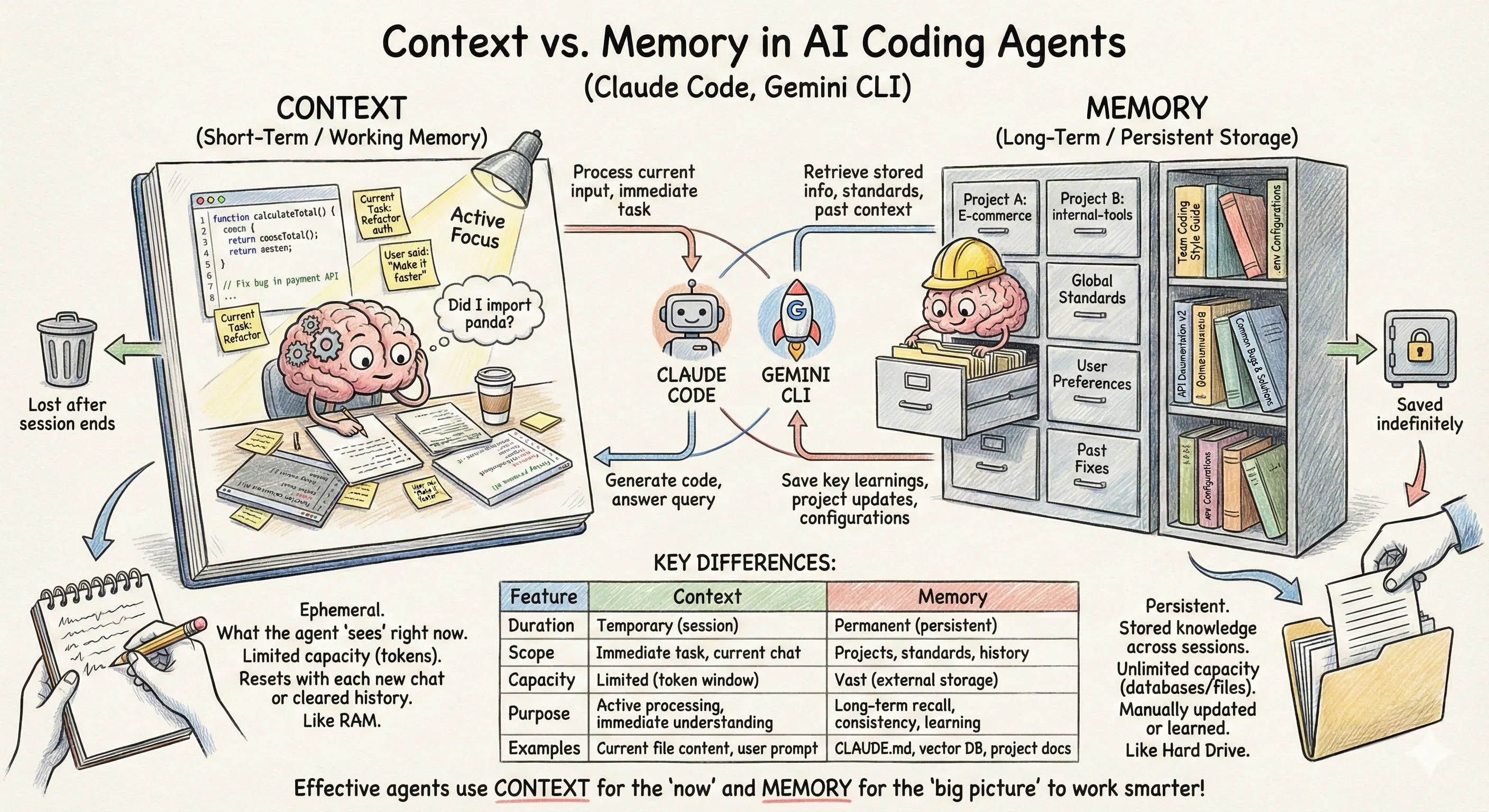
Context gets used for things that are important now such as importing the specific library you asked it to use in that last prompt. Memory will always end up in a coding agents context but if you need to start a new session or constantly keep including the same information like, “We use Polars for data manipulation” in your prompts then memory is going to help keep your sanity and make your agent more performant by avoiding the need to constantly search and understand your codebase or potentially using the wrong tools (like reaching for pandas when you want polars).
How do I use memory in a coding agent?
One file does plenty approach
The most basic approach to giving your coding agent memory is quite literally one markdown file in your project root named CLAUDE.md, AGENTS.md or GEMINI.md depending on your cli coding agent of choice.
1
2
3
4
5
6
7
8
9
my-fullstack-app/
├── CLAUDE.md                # Instructions, rules and info for the whole project
├── backend/
│   ├── src/
├── frontend/
│   ├── src/
│   └── tests/
└── docs/
    └── api-spec.md
You fill this up with rules, styles and general project information that you find yourself repeating in your prompts, or know the agent will need beforehand.
Eventually you’ll look at this markdown file that has pieces of information one line after another and start separating it into relevant sections under headers like “Build Process for the Front End” or “Backend authentication mechanisms”. This can get you quite far and will work to help provide your coding agent a quick start to your projects dos and don’ts without needing to infer key pieces of information every time.
However, you will get to a point especially in larger projects where the instructions for your frontend in CLAUDE.md (or whichever flavour) are taking up so much context it’s starting to confuse your agent when working on backend code and it starts trying to run npm run preview instead of npm run dev. Even worse, this mega markdown file will become a pain to manage and you’ll soon find yourself ctrl+f’ing everytime to find where you put that prod build command instruction.
Modular memory files to the rescue
To escape this nightmare of a singular markdown behemoth that attempts to encompass your project you can split out pieces of information about your project into relevant files.
Claude Code has a few flavours you can use and a very handy table in their docs to help you decide which memory type you need.
I’m going to focus on rules and imports for now as I think they give you the biggest productivity gains especially when you need to manage this across a team.
Rules
Now we have a full stack project with our project structured to include rules that allow for a better structure and are easier to organise.
1
2
3
4
5
6
7
8
9
10
11
12
13
14
15
16
17
18
19
20
21
my-fullstack-app/
├── .claude
   ├── CLAUDE.md # General project wide guidance
   ├── rules
       ├── backend # Specific rules for guidance
           ├── style-guide.md
           ├── database.md
           ├── security.md
           ├── testing.md
       ├── frontend
           ├── style-guide.md
           ├── database.md
           ├── security.md
           ├── testing.md
├── backend/
   ├── src/
├── frontend/
   ├── src/
   ├── tests/
└── docs/
   └── api-spec.md
Path specific rules
Rules are great for you and your team but all those markdown files are still loaded for with the same priority as your ./claude/CLAUDE.md file. Path specific rules let you tell Claude Code, only load and apply these rules when working with files of these types. You can tell Claude when to use these specific rules with YAML front matter and standard glob pattern matching. For instance, I want Claude Code to only use this rule with files that are in my backend directory, it could look like this.
1
2
3
4
5
6
7
8
9
10
11
---
paths:
  - "backend/src/**/*.py"
---

# Backend Development Rules

- Enforce Pydantic Schemas for Every Endpoint
- Use "Dependency Injection" for Database Sessions
- Routes should only handle request parsing. Use services for business logic.
I want to import the same instructions into multiple rules
What if you want to use path specific rules but also have some general guidance for something like authentication for both frontend and backend. You could copy and paste it in each path specific rule file but inevitably they will get out of sync. Luckily there’s an easier way.
Both Gemini CLI and Claude Code solve this similarly. Essentially, you need to use @path/to/file-you-want-to-import.md in your CLAUDE.md or rules files. Both relative and absolute paths work.
Importing another rules file somewhere in the file where it naturally fits is a good idea. i.e. If you have an ## Authentication section you should probably import the authentication file in there too.
1
2
3
## Authentication
@/auth/auth-rules.md
- Always use `custom-backend-jwt-lib` for JWT authentication
Note: Codex CLI handles this slightly differently with its knowledge format and memory URLs.
Make your coding agent remember for you
Your coding agent is already doing most of your coding for you but you’re still managing your memory files manually? Don’t forget that whatever you (or claude) have discovered in a session you can get it to document in accordance with your nicely structured rules layout.
A prompt like document the findings for the work done in that last commit in @.claude/rules/backend/auth.md can save you from needing to manually type out a new nuance that needs to be considered.
If you find yourself doing this often enough it might be worth creating a skill so that the documentation Claude writes can even be to your liking.
Takeaways
Learn these built-ins before reaching for another dependency or tool to manage your memory. They can take you and your team a surprisingly long way in better managing memory and context in Claude Code (or whatever coding agent you use).
If you still feel like you’re missing something, be it security assurances around these markdown files or searchability for truly massive projects. Then start to reach for the more specialised tooling that’s popping up, otherwise you might just be creating more work for yourself than it’s worth.